
Investigating Session Desktop: Decryption and Artefact Analysis on Windows and macOS

Analysing Session chat application on Windows and macOS
Author: Arun KALACKATTU HARI (06/03/2026)
Session is an open-source, public-key-based secure messaging application designed to provide private and anonymous communication. The platform uses the Session encryption protocol together with the Oxen blockchain’s decentralised Service Node network to transmit messages without relying on centralised infrastructure.
Instead of routing communications through traditional servers, Session messages are relayed across distributed Service Nodes organised within the Oxen network. Messages are transmitted using onion routing, meaning that each message passes through multiple nodes before reaching its destination. This architecture prevents any single node from identifying both the sender and the recipient, significantly reducing metadata exposure.
Unlike many messaging platforms that require phone numbers or email addresses, Session generates a cryptographic account identity locally on the user’s device. This identity is derived from a public/private key pair and allows users to communicate without linking their real-world identity to the application.
This article examines how Session Desktop stores its artefacts on Windows and macOS systems, how its encryption mechanisms operate, and the methodology required to decrypt and reconstruct conversations and attachments during forensic analysis.
Location of Session Data
Windows
On Windows systems, Session stores its application data within the user’s roaming profile:
C:\Users\<username>\AppData\Roaming\Session\
Each Windows user account maintains its own independent Session directory. When analysing forensic images, this directory is typically accessible once the relevant user profile has been mounted.
macOS
On macOS systems, Session user artefacts are stored at:
/Users/<username>/Library/Application Support/Session/
Session Artefacts
The primary artefacts within the Session directory include:
config.json
Contains configuration settings and cryptographic material required by the application.
db.sqlite
An SQLCipher-encrypted SQLite database storing conversations, messages, metadata, and internal encryption material.
attachments.noindex/
A directory containing encrypted attachment blobs.
These artefacts must be analysed together in order to reconstruct conversations and recover associated media attachments.
Session Configuration File (config.json)
The config.json file contains configuration parameters used by the Session client as well as cryptographic material associated with database access.
Example configuration:
{
  "key": "d406a9688fc33ee2b8f93bc8d83f1a4dc4347aba1b6a07c96f2c2bb548108813",
  "opengroupPruning": true,
  "dbHasPassword": false
}
Two operational scenarios may be encountered during forensic analysis depending on the value of the dbHasPassword parameter.
Scenario 1 – No Application Password Enabled
{
  "key": "d406a9688fc33ee2b8f93bc8d83f1a4dc4347aba1b6a07c96f2c2bb548108813",
  "opengroupPruning": true,
  "dbHasPassword": false
}
When dbHasPassword is false, the SQLCipher key stored in the key field can be used directly to decrypt the db.sqlite database.
In this configuration:
- The database encryption key is stored in
config.json - The database can be opened using this key together with the required SQLCipher parameters
- No additional user password is required
Scenario 2 – Application Password Enabled
{
  "key": "d406a9688fc33ee2b8f93bc8d83f1a4dc4347aba1b6a07c96f2c2bb548108813",
  "opengroupPruning": true,
  "dbHasPassword": true
}
When dbHasPassword is true, the user has enabled an application unlock password within the Session client.
In this configuration:
- The application password replaces the key stored in
config.jsonas the credential used to unlock the SQLCipher-encrypted database. - The key stored in
config.jsonalone is not sufficient to decryptdb.sqlite. - The user-defined application password must be supplied to access the database.
Database Encryption (SQLCipher)
db.sqlite is encrypted using SQLCipher, which implements AES-256 encryption.
Key characteristics include:
- The encryption key is stored in
config.json - The key is represented as a 64-character hexadecimal value
- The database cannot be opened without the correct key and cipher configuration
SQLCipher parameters used during forensic analysis include:
PRAGMA cipher_default_compatibility = 4;
PRAGMA cipher_page_size = 4096;
PRAGMA kdf_iter = 256000;
PRAGMA cipher_hmac_algorithm = HMAC_SHA512;
PRAGMA cipher_kdf_algorithm = PBKDF2_HMAC_SHA512;
Once the correct key and parameters are applied, the encrypted database can be queried to perform analysis.
JSON-Centric Data Storage
Session stores much of its internal application data within JSON structures embedded inside SQLite tables.
These JSON objects may contain:
- Message bodies
- Sender identifiers
- Attachment metadata
- Original filenames
- Message timestamps
This structure differs from traditional relational schemas and requires additional parsing when reconstructing conversations.
Attachment Encryption
Media attachments are protected using a separate encryption mechanism.
Session encrypts attachments using ‘libsodium’s secretstream API’, specifically the XChaCha20-Poly1305 authenticated encryption scheme.
Key characteristics include:
- Each attachment is encrypted individually
- Attachments use a separate encryption key from the database
- The attachment encryption key is stored inside db.sqlite.
- Attachments cannot be decrypted until the database has been successfully decrypted
Extracting the Attachment Encryption Key
Within the decrypted database, the attachment encryption key is stored inside the items table under the entry:
'local_attachment_encrypted_key'
This value is stored as JSON data.
Attachment Decryption Process
Analysis of the TypeScript(ts) code responsible for attachment encryption (available in the Session GitHub repository) clearly documents how media attachments are encrypted and provides a reliable reference for forensic decryption.
Session uses:
- XChaCha20 for encryption
- Poly1305 for authentication and tamper detection
Each attachment file follows a consistent structure:
For each attachment:
- Initialise a libsodium secretstream pull state
- Decrypt the encrypted payload
- Identify the file type using magic byte signatures
- Write the decrypted file with the appropriate extension
This process converts encrypted attachment blobs into usable media files.
Restoring Original Filenames
Session stores original filenames within message metadata contained inside JSON objects in the database.
Using this metadata, decrypted attachments can be renamed to their original filenames.
During this process:
- Filenames are sanitised for filesystem compatibility
- File extensions are preserved
- Naming collisions are handled safely
This step transforms previously unreadable encrypted blobs into recognisable files suitable for review and disclosure.

Session parser tool is available on my GitHub repository: ardfr/Session-Chat-pasrer-for-Windows-and-MacOS.: Session chat application parser: Windows and MacOS
Forensic Analysis of the iOS Signal Application

Forensic Analysis of the iOS Signal Application
Author: Arun KALACKATTU HARI (26/02/2026)
Signal is widely regarded as one of the most secure messaging applications available today.
Its architecture prioritises privacy through strong end-to-end encryption, modern
cryptographic standards, and secure local storage.
This article outlines the forensic analysis of Signal on iOS, the methodology used to decrypt
its encrypted database, and the development of a custom parser to extract messages, calls,
and attachments in a structured manner.
This article outlines:
- The location of Signal artefacts on iOS
- Decryption of the SQLCipher-protected database
- Interpretation of message, call, and attachment structures
- Attachment decryption methodology
- Development of a custom Python GUI parser to automate structured extraction
Location of Signal Data on iOS
On iOS devices, Signal stores its user data within the shared App Group container:
/private/var/mobile/Containers/Shared/AppGroup//
The folder structure within this signal directory is :
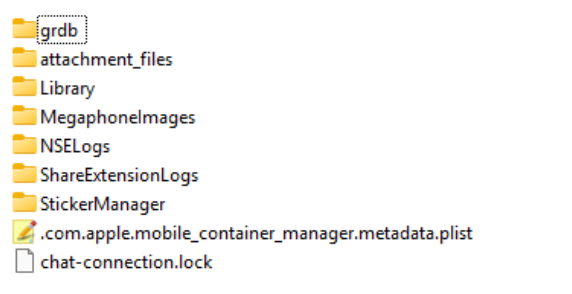
the primary user database is located at:
/grdb/Signal.sqlite
This database contains message content, call records, attachment metadata, thread
information, and user profile data.
SQLCipher Encryption
The Signal.sqlite database is encrypted using SQLCipher. Successful decryption
requires correct PRAGMA configuration parameters.
The following configuration was required in this analysis:
PRAGMA key = “x'{key_hex}'”;
PRAGMA cipher_page_size = 4096;
PRAGMA kdf_iter = 256000;
PRAGMA cipher_hmac_algorithm = HMAC_SHA512;
PRAGMA cipher_kdf_algorithm = PBKDF2_HMAC_SHA512;
PRAGMA cipher_plaintext_header_size = 32;
Key Observations
- The first 32 bytes of the database are plaintext (header).
- The database uses PBKDF2-HMAC-SHA512 with 256,000 iterations.
- HMAC validation is enabled using SHA512.
- Page size is 4096 bytes.
Once decrypted, the database can be queried using standard SQLite methods.
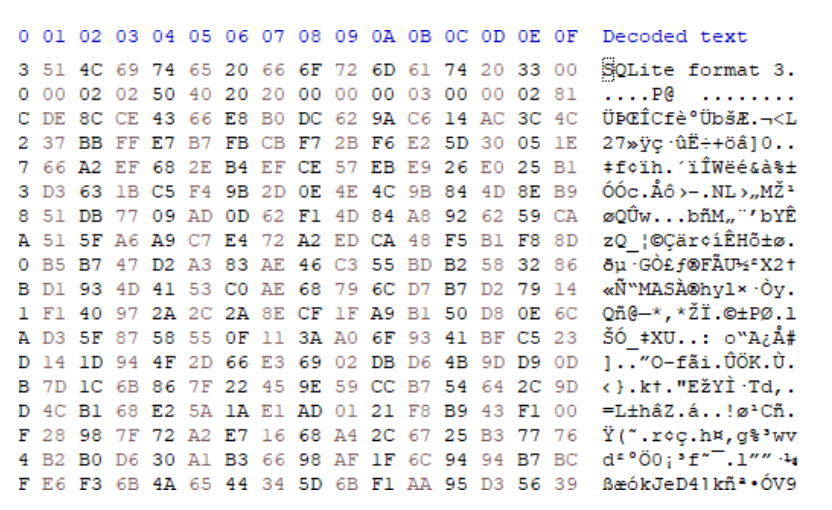
Figure 2: Unencrypted Signal.sqlite header.
Once the correct key and parameters are applied, the database becomes accessible for
standard SQL querying.
The decryption key was recovered from a full file system extraction. In this instance, the key
material was decoded from the keychain.plist artefact.

Figure 3: Signal. SQLite cipher key obtained form keychain.plist
Message Records – model_TSInteraction
The table model_TSInteraction contains the primary message records. This table
stores:
- Message text
- Timestamps (UNIX epoch in milliseconds)
- Thread identifiers
- Call-related metadata
- Message classification values
Table ‘model_TSInteraction’ column values are shown below:
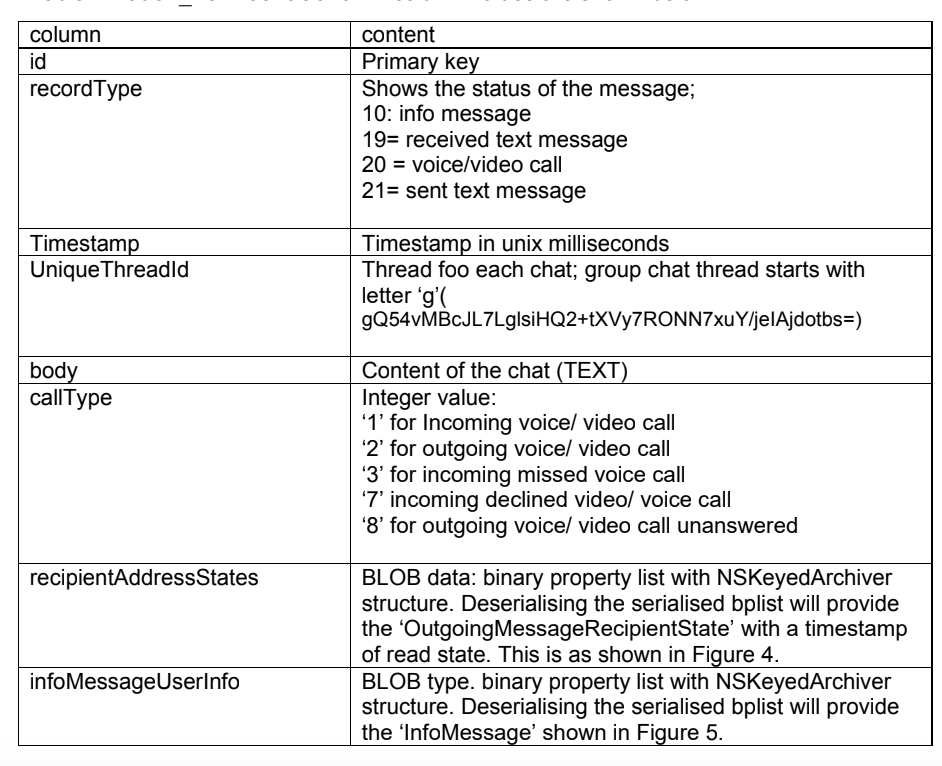
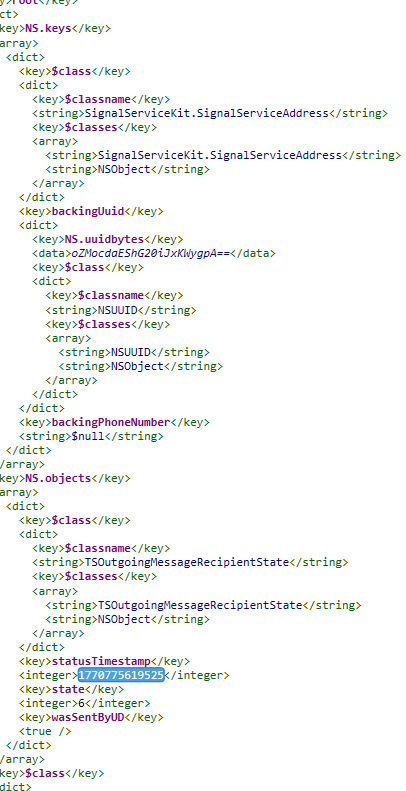
Figure 3: deserialised Bplist with ‘recipientAddressStates’ value.
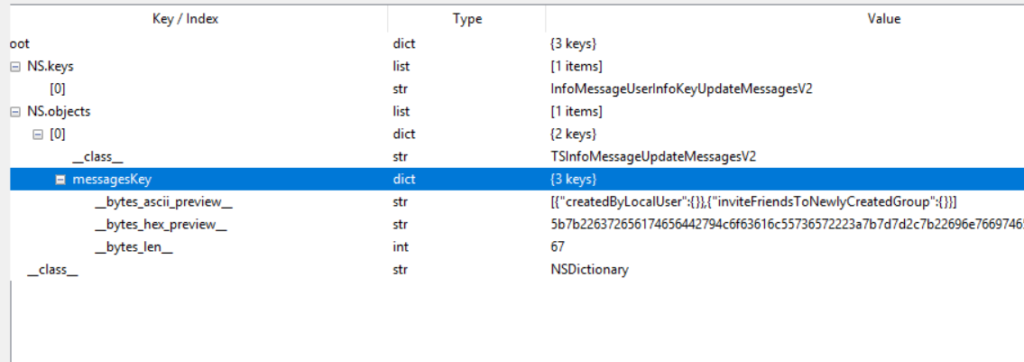
Figure 5: deserialised Bplist with ‘infoMessageUserInfo’ value.
Call Artefacts
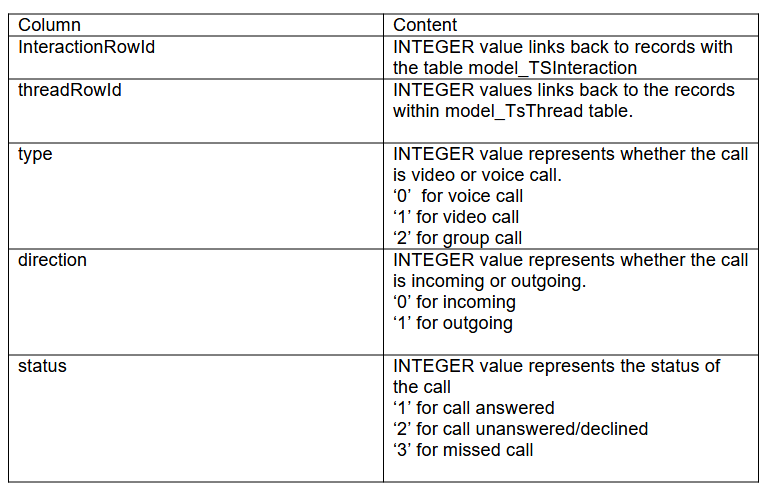
Signal stores call information across two locations:
- model_TSInteraction.callType
Stores call-related message indicators. - CallRecord Table
Stores structured call log data, including: - type (voice, video, group)
- direction (incoming/outgoing)
- status (answered, declined, missed)
The column values of callRecord table are as below:
Attachments
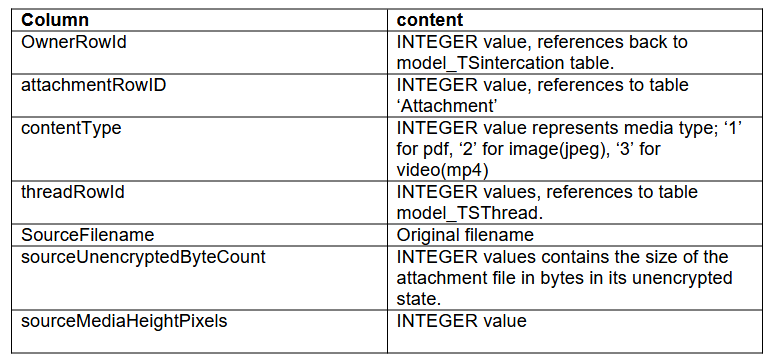
Table: MessageAttachmentReference
This table links messages to attachment records.
Table ‘MessageAttachmentReference’ contains details about the attachments:
User information
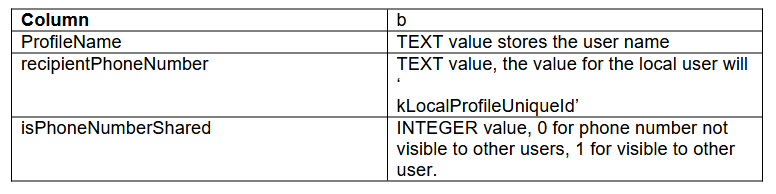
Table ‘model_OWSUserProfile’ stores signal users’ information.
Chat Threads
Table ‘model_TSThread’ stores information about chat threads.
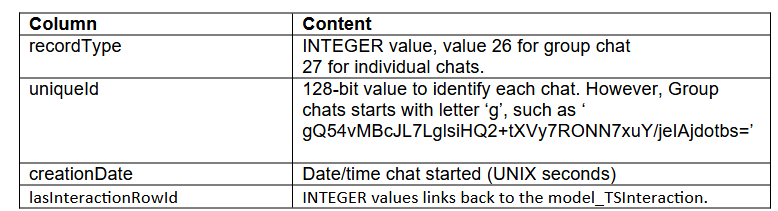
Attachment
Table ‘Attachment’ stores information regarding the attachment files.
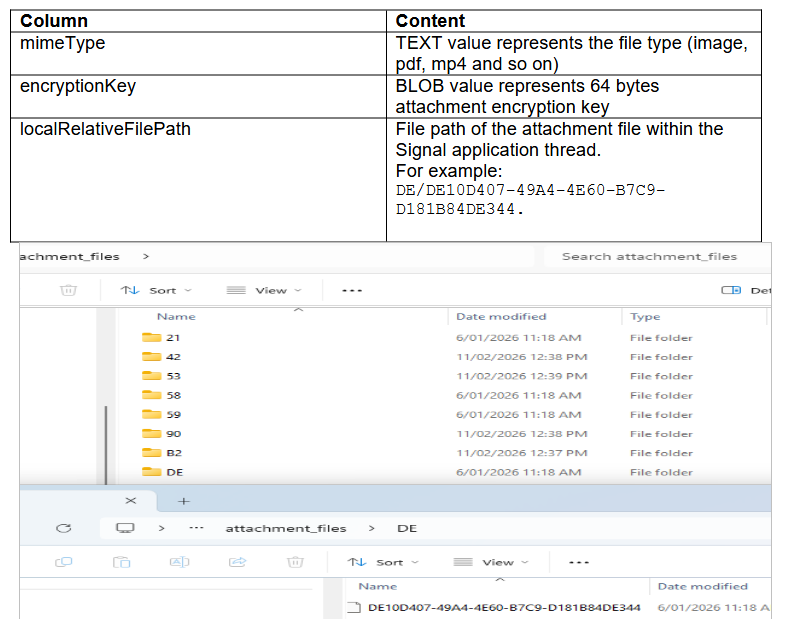
Attachment decryption process
Attachments are encrypted using AES-256-CBC.
Each attachment record contains a 64-byte encryption key:
- First 32 bytes → AES key
- First 16 bytes of encrypted file → IV
Decryption workflow:
- Extract encryption key from Attachment.encryptionKey
- Separate AES key (first 32 bytes)
- Extract IV from encrypted file header
- Decrypt using AES-256-CBC
- Validate output using known file signatures (magic bytes)
SQL Query for signal. SQLite can be downloaded from:ardfr/signal-ios-parser: Signal iOS SQLCipher parser with HTML reporting and attachment decryption.
The following query consolidates:
- Messages
- Threads
- Attachments
- Call records
- Author information
iOS Signal Decoder – Custom Python Parser
To streamline this process, I developed a custom Python based iOS Signal Application Parser.
Capabilities are:
- Accepts encrypted Signal.sqlite
- Accepts recovered SQLCipher key
- Applies required PRAGMA parameters
- Executes structured extraction queries
- Generates:
- HTML reports
- CSV exports
- Decrypted attachment files
This tool is available on my GitHub repository: ardfr/signal-ios-parser: Signal iOS SQLCipher parser with HTML reporting and attachment decryption.
Forensic Analysis of Microsoft.ZuneMusic_8wekyb3d8bbwe (Windows Media Player)
Forensic Analysis of Microsoft.ZuneMusic_8wekyb3d8bbwe
Author: Arun KALACKATTU HARI (03/03/2026)
Modern Windows systems utilise packaged applications built on the Universal Windows Platform (UWP) framework. One such application is Windows Media Player (legacy Groove-based version), whose package identity is:
“Microsoft.ZuneMusic_8wekyb3d8bbwe”
The suffix:
“8wekyb3d8bbwe”
is Microsoft’s publisher ID, commonly seen across many built-in Microsoft Store applications.
Although the branding evolved from Zune Music to Groove Music, and later to the redesigned Windows Media Player in Windows 11, the underlying package identity remained unchanged for compatibility and update continuity.
Application Overview
Windows Media Player (UWP version) is designed to:
- Play audio and video files
- Automatically index media folders
- Create and manage playlists
- Display album and video metadata
- Track recently played content
All configured music and video folders on the local machine are automatically indexed and displayed within the application library.
User Data Location
User-specific data for this application is stored at:
C:\Users\<user-name>\AppData\Local\Packages\Microsoft.ZuneMusic_8wekyb3d8bbwe
Folder structure within this directory is:
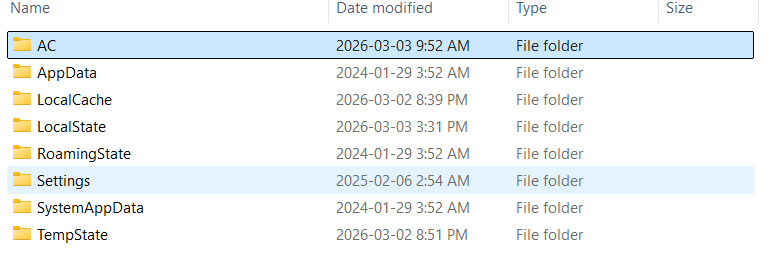
Within this directory, the primary forensic artefacts reside in:
“LocalState”
Forensic Value of Microsoft.ZuneMusic_8wekyb3d8bbwe
From an investigative perspective, this package may provide:
- Indexed media file paths
- Media metadata (artist, album, title)
- Playback timestamps
- Recently played files
- Cached thumbnail images
- Video library folder references
Key Artefact: MediaPlayer.db
The primary database artefact is:
‘MediaPlayer.db’
This is an SQLite database located within:
‘LocalState’
It contains structured tables relating to indexed and recently played media.
AppState.json
Another important artefact is:
‘AppState.json’
This json file stores metadata relating to the most recent application activity, including:
- Last opened file
- Playback position
- Application state at closure
For example, if a video named 0019.MTS is opened in media player and paused at 10 seconds, the JSON file records (shown in figure below):
- The source file path
- Playback progress timestamp
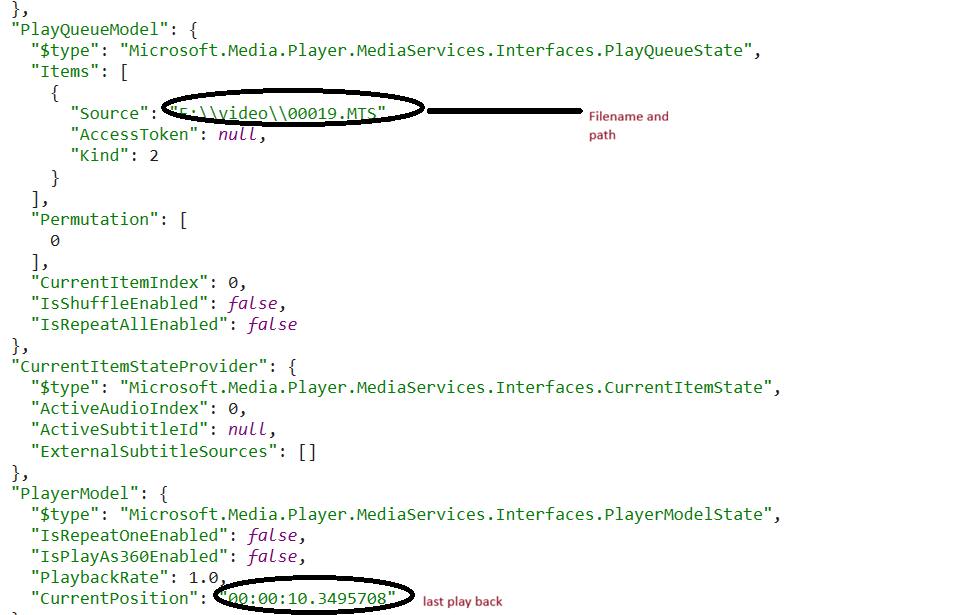
This artefact can be useful in establishing:
- Exact playback position
- Whether the file was actively viewed
- Last interaction with the application
MediaPlayer.db – Table Analysis
1. Table ‘File’
The File table stores information relating to recently played media files.
| Column | Description |
|---|---|
| Uri | Full file path including file name |
| Id | Unique identifier linked to the RecentlyPlayed table |
Analysis indicates that this table stores up to 25 last played files.
2. Table ‘RecentlyPlayed’
This table records playback activity.
| Column | Description |
|---|---|
| Id | Unique identifier linked to File table |
| ItemType | ‘4’ = Audio file ‘5’ = Video file |
| PlayedTime | Last played timestamp (Microsoft ticks format) |
The PlayedTime value is stored in Microsoft ticks (100-nanosecond intervals since 1 January 1601 UTC).
Analysis suggests this table stores 29 recently played entries, including both audio and video content.
3. Album and Media Tables
The Album table reflects the album listings displayed on the Media Player home page.
This table is populated when:
- A user adds a folder containing media files
- The application indexes the contents of that folder

4. Adding a Folder to the Video Library
When a user adds a folder to the Video Library:
- The media files within that folder are indexed
- The Video table in
MediaPlayer.dbis populated - Corresponding entries appear in the application interface
5. Table ‘Video’
The Video table includes:
| Column | Description |
|---|---|
| Uri | Full video file path |
| ParentFolderId | Identifier linking to video folder table |
| ItemsCount | Number of media items within the folder |
SQL Query to find recently palyed files is:
“”SELECT
File.Uri,
datetime(
(RecentlyPlayed.PlayedTime / 10000000.0) – 62135596800,
‘unixepoch’
) AS PlayedTime_UTC
FROM File
JOIN RecentlyPlayed
ON File.Id = RecentlyPlayed.Id
ORDER BY PlayedTime_UTC ASC;””
LocalCache
This directory contains cached image artefacts generated by the application, including:
- Album artwork
- Video thumbnails
- Preview frames
- Media tile images
These images are generated when:
- A folder is added to the media library
- A media file is indexed
- A video is opened or previewed
- The media grid view renders thumbnails
Cached files are located within ‘LocalCache\Image’ as shown below:
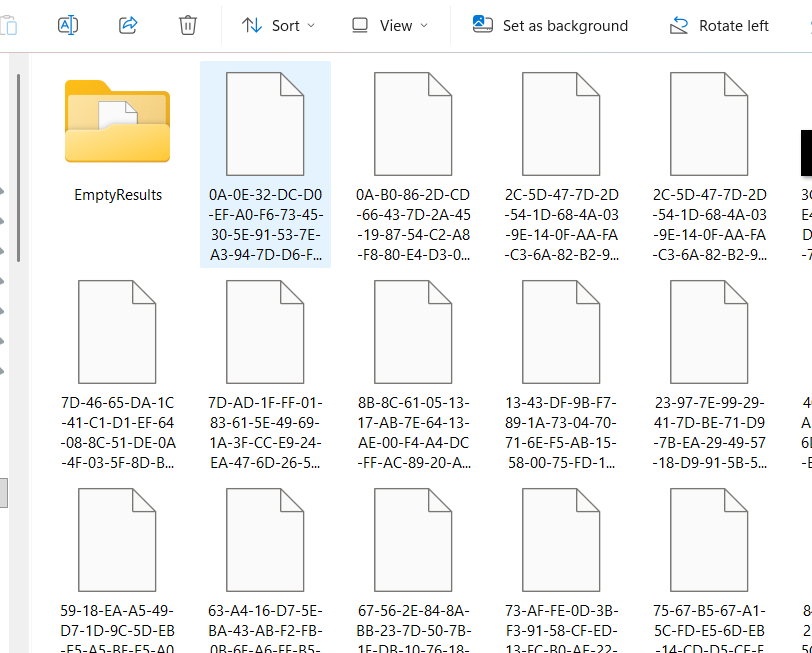
Analysis showed that the filenames follow this path:
“”<Hash>-<Variant>-<Width>-<Height>””
For example:
0A-B0-86-2D-CD-66-43-7D-2A-45-19-87-54-C2-A8-F8-80-E4-D3-03-B6-A7-71-82-FF-1B-C0-23-ED-F8-05-AA-0-512-512.
The first 32 bytes of the file name is the sha256 of the normalized_media_identifier/uri.
The cache file names are cerated using the fucntion:
“SHA256(URI_string_UTF8)→ dash-separated hexadecimal→ append “-0-<width>-<height>””
To support validation and correlation, I have developed a tool that analyses URI values across MediaPlayer.db and links them to cache files located in LocalCache\Image. This enables deterministic verification of cache filename to media relationships.
This tool is available on my GitHub repository: ardfr/mediaplayer-localcache-cachekey: Deterministically correlates Windows Media Player LocalCache
Forensic Analysis of Reddit App: iOS and Android
Overview
Reddit is a widely used social media and discussion platform where users interact through posts, comments, and direct messaging. This article examines the primary data storage locations and database schemas for both the iOS and Android Reddit applications, with a focus on chat-related artefacts.
Reddit Entity Identifiers
Reddit assigns type-prefixed unique identifiers to entities across its platform. Two prefixes are of particular relevance to forensic analysis:
| Prefix | Entity Type | Example |
|---|---|---|
t2_ | User account | t2_abc123 |
t5_ | Subreddit (community) | t5_h4rleg |
A subreddit is a topic-based community within Reddit. Each is internally referenced by its t5_ key, which appears as a linking value across multiple databases documented in this article.
Possible Matrix Protocol Integration
During analysis of the Reddit application, several artefacts were observed that appear consistent with the Matrix open communication protocol. These include directory paths referencing MatrixChat, a database named matrix_session_*.db, and event type strings such as m.room.message and m.room.member. This has not been confirmed through network-level analysis or vendor documentation, and should be treated as an investigative observation pending further validation.
For context, the Matrix specification defines a set of open APIs for decentralised, federated communication.
User Identification
Reddit user account is identified by a unique user ID in the format:
@localpart:domain
For example, a Reddit user ID observed during analysis takes the form:
@t2_2ax0rdzalz:reddit.com
Events and Rooms
Under the Matrix specification, all data exchanged is expressed as an event corresponding to a single client action. Event types follow a globally unique naming convention, the reserved top-level namespace m. denotes specification-defined types, such as m.room.message for instant messages. The event type strings observed within the Reddit app databases are consistent with this scheme.
Rooms are the conceptual spaces in which events are exchanged, each uniquely identified by a Room ID in the format:
!opaque_id:domain
iOS Reddit Application
Data Storage Overview
Reddit on iOS stores its data within the standard application sandbox. The two primary container paths are:
/private/var/mobile/Containers/Data/Application/<GUID>/
/private/var/mobile/Containers/Shared/AppGroup/<GUID>/
Primary storage formats are SQLite databases, Binary Property Lists (bplist), and JSON files.
1. Account.db – Chat Data
The Account.db SQLite database stores chats. It is located at:
/private/var/mobile/Containers/Data/Application/<GUID>/Library/Caches/MatrixChat/roomsAccount/<account_id>/AccountXX/Account.db
Table: ZACCOUNTSTORAGETIMELINE
| Column | Content |
|---|---|
Z_OPT | Integer value unique to each chat thread |
ZBYTESIZE | Actual size of the chat thread |
ZNUMBEROFITEMS | Number of item records for the thread |
ZTIMELINEIDFIELD | Unique thread ID — format: m|"id" linked to ZACCOUNTSTORAGETIMELINEITEM |
Table: ZACCOUNTSTORAGETIMELINEITEM
Stores individual message records within each thread. The column ZEVENTTYPEFIELD is key to interpreting the ZDATA payload, as the JSON structure varies by event type.
| Column | Content |
|---|---|
ZBYTESIZE | Size of the record in bytes |
ZORIGINSERVERDATE | Apple absolute timestamp |
ZEVENTTYPEFIELD | Event type within the chat thread |
ZDATA | JSON value corresponding to ZEVENTTYPEFIELD |
ZITEMIDFIELD | Unique room/message thread ID — links to ZTIMELINEIDFIELD |
ZSENDERFIELD | Unique Reddit ID of the chat sender |
Event Types – ZEVENTTYPEFIELD
| Event Type | Description |
|---|---|
com.reddit.chat.type | Chat type (direct or group) |
m.room.member | Membership events — invitation and join details |
m.room.message | Message body content |
m.room.create | Room creation details |
m.room.history_visibility | History visibility settings |
m.room.join_rules | Join conditions for the room |
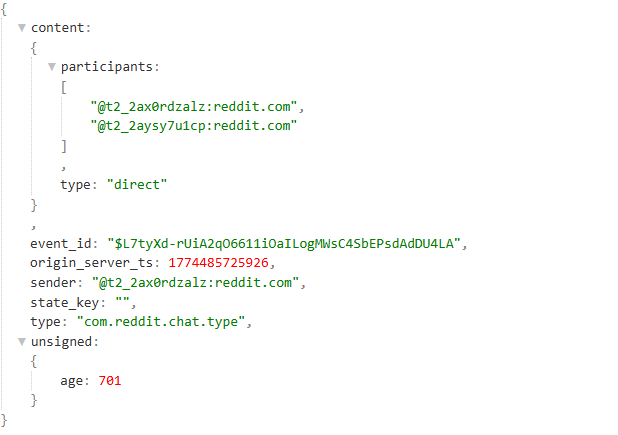
com.reddit.chat.type
The ZDATA field for this event type reveals whether the chat is a direct or group conversation.
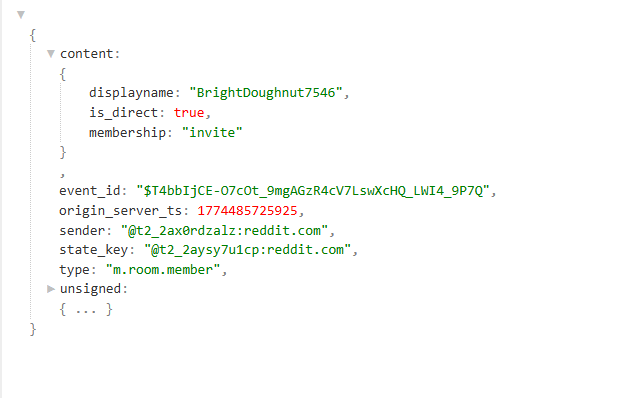
m.room.member
ZDATA for this event type contains room member details including invitation data used to initiate the chat.
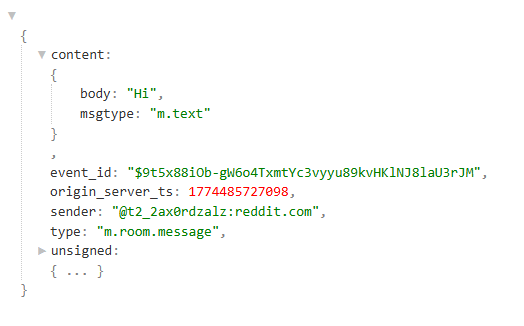
m.room.message
This event provides the message body, sender Reddit ID, and a UNIX millisecond timestamp.
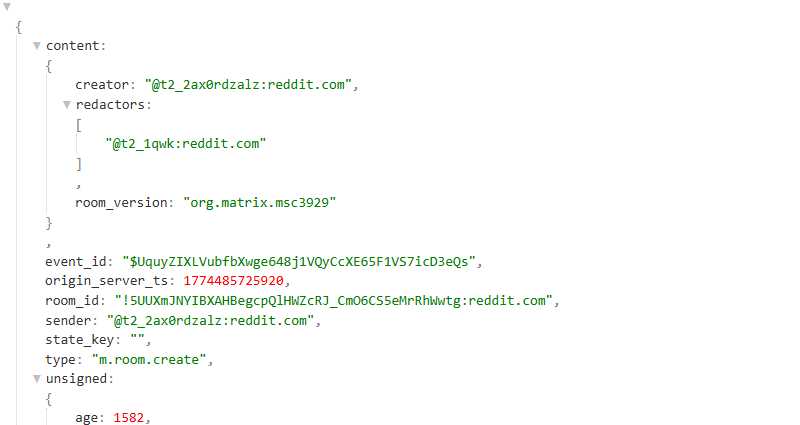
m.room.create
ZDATA for this event type contains room creator details.
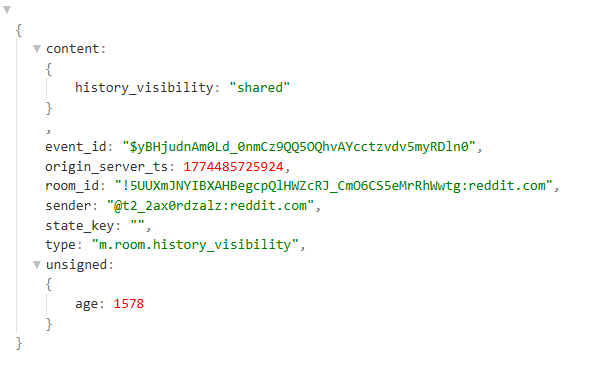
m.room.history_visibility
ZDATA reveals the history visibility configuration for the room.
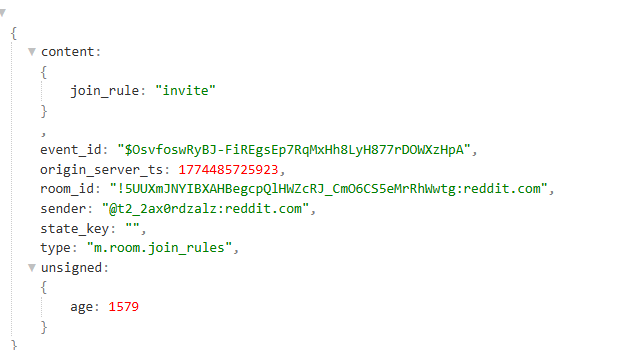
m.room.join_rules
ZDATA indicates how the user joined the room.
2. RoomsUsersService.db – User Attribution
This SQLite database stores user identity details and supports attribution of chat participants. It is located at:
/private/var/mobile/Containers/Data/Application/<GUID>/Library/Caches/MatrixChat/redditAccount/<account_id>/RedditUsers-7/RoomsusersService.db
The table of forensic interest is ZKEYVALUESTORAGEBASEELEMENT:
| Column | Content |
|---|---|
ZKEY | Reddit user ID |
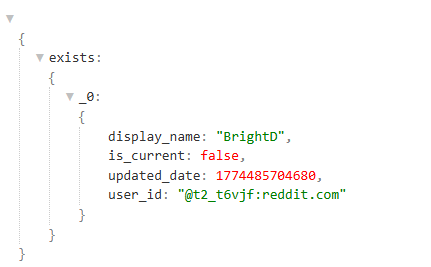
ZVALUE | JSON containing display name, updated date, and Reddit ID |
3. ContentService.db – Media Attachments
This SQLite database stores metadata for files shared via chat. It is located at:
/private/var/mobile/Containers/Data/Application/<GUID>/Library/Caches/MatrixChat/redditAccount/<account_id>/Downloads-6/ContentService.db
| Column | Content |
|---|---|
ZSIZE | File size in bytes |
ZACCESSDATE | File access time (Apple absolute time) |
ZKEY | Key linked to m.room.message ZDATA value |
ZFILENAME | Filename within the filesystem |
ZMETADATA | File metadata as a JSON object |
Media Storage Location
The actual media files — images, videos and other shared content — are stored separately at:
Library/Caches/MatrixChat/roomsAccount/<account_id>/Downloads-*/Files/
4. SubredditSubscriptions – bplist
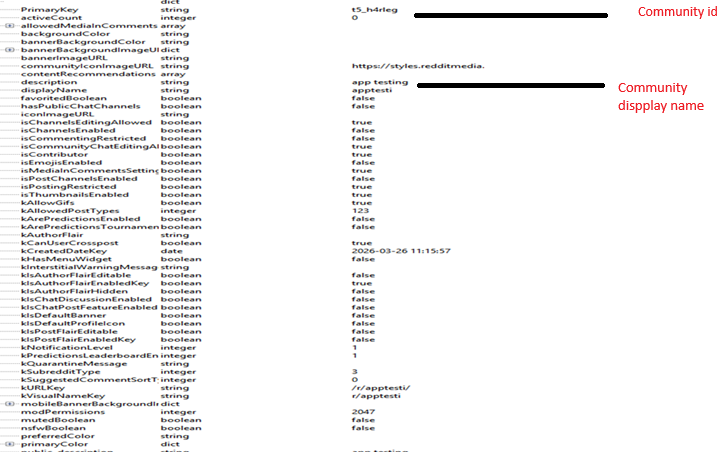
Subreddit subscription data is stored as a Binary Property List (bplist) using NSKeyedArchive serialisation and must be deserialised prior to analysis. The primary key within the deserialised output is the t5_ community identifier, which can be used to cross-reference community data in other databases.
Posts associated with a subscribed community can be queried using the t5_ key within the sqlNormalizedCache.sqlite database, located at:
private/var/mobile/Containers/Shared/AppGroup/<GUID>/Library/Application Support/<Reddit_Id>/sqlNormalizedCache.sqlite
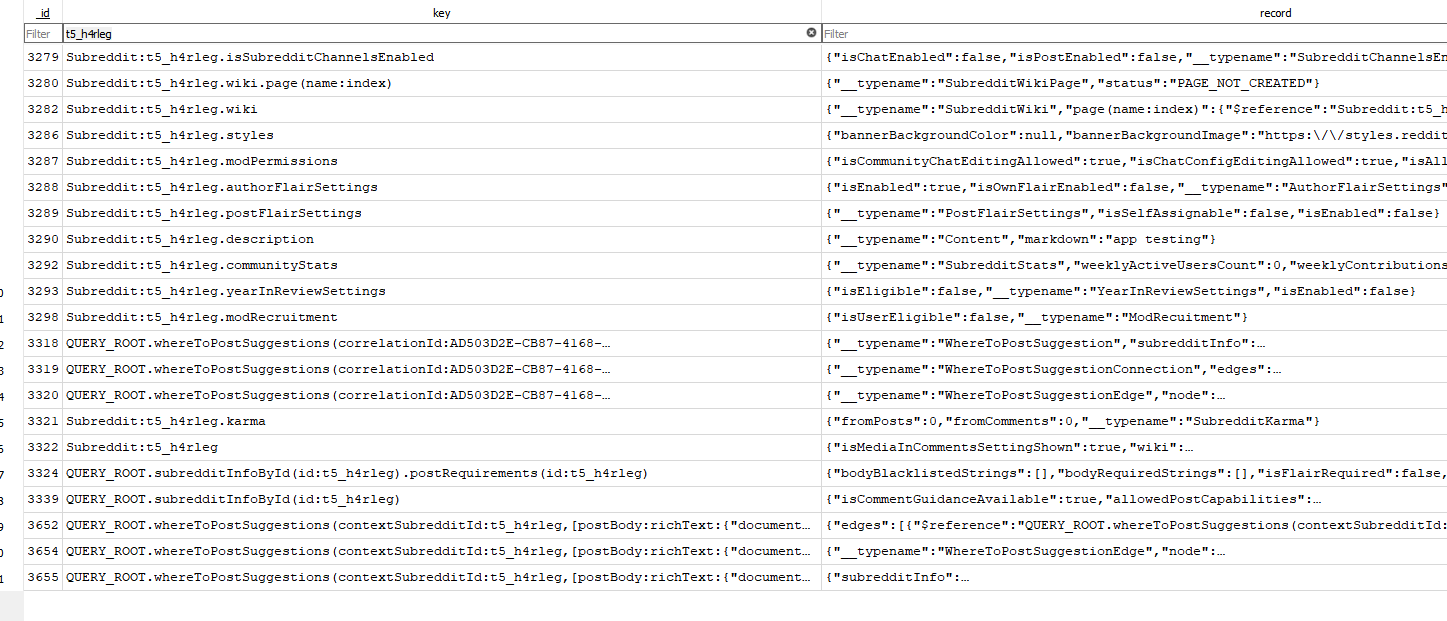
Community moderator information can also be extracted from this database:

Android Reddit Application
Data Storage Overview
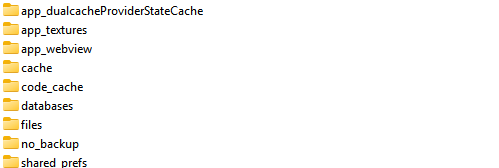
The package name for Reddit android application is com.reddit.frontpage. All user data is contained within the standard application data directory:
data/data/com.reddit.frontpage/
matrix_session_<uniqueid>.db – Chat Data
Chat data is stored within a SQLite database whose naming convention is consistent with a Matrix session. The database is located at:
data/data/com.reddit.frontpage/databases/matrix_session_<uniqueid>.db
The tables of primary forensic interest are: event, rooms, room_member_summary, room_summary, timeline_event and users.
Table: event
Stores the different event types as documented in the iOS section above. The event type m.room.message is associated with chat messages within a room. Each record represents a single event — the type column identifies the event kind, and the content column holds the corresponding JSON payload.
Table: rooms
Stores unique Room IDs (roomId) for each conversation. Each row represents a distinct chat room and serves as the primary reference for joining against timeline_event and room_member_summary.

Table: room_member_summary
Stores participant details for each room, enabling attribution of messages to specific users.

Table: timeline_event
Records all events within each room in chronological order. The column eventId links to the event table; joining these two tables on eventId reconstructs the full event timeline for a conversation. Filtering on e.type = 'm.room.message' isolates chat message records.
reddit_db_<userdisplayname> – User Validation
A secondary SQLite database is named after the local user’s display name, providing an additional means of confirming the device account. Tables of forensic interest:
account— stores user account ID, display name, and account creation time (UTC)recent_subreddits— stores community ID, display name, and community type
SQL Query — Extracting Chat Artefacts (Android)
The query below extracts and correlates chat message artefacts from matrix_session_<uniqueid>.db. It joins timeline_event, event, and room_member_summary to produce a timeline of messages with sender display name resolution:
SELECT DISTINCT
    te.roomId,
    te.eventId,
    te.senderName            AS timeline_senderName,
    e.type,
    json_extract(e.content, '$.body')    AS body,
    json_extract(e.content, '$.msgtype') AS msgtype,
    e.content                AS full_content_json,
    e.sender                 AS original_sender,
    COALESCE(rms.displayName, e.sender)  AS sender_display_name,
    e.originServerTS         AS originServerTS_ms,
    datetime(
        e.originServerTS / 1000,
        'unixepoch',
        '+10 hours',
        '+30 minutes'
    )                        AS originServerTS_utc_1030
FROM timeline_event te
LEFT JOIN event e
    ON te.eventId = e.eventId
LEFT JOIN room_member_summary rms
    ON e.sender = rms.userId
    AND rms.roomId = te.roomId
WHERE e.type = 'm.room.message'
ORDER BY te.roomId, e.originServerTS;
Reddit iOS Parser
A parser has been developed to automate artefact extraction from the iOS MatrixChat directory structure. The tool takes the root roomsAccount folder as input and produces CSV and HTML reports suitable for review and case documentation.
Input path example:
Library/Caches/MatrixChat/roomsAccount/62663bab…768faf
Available on GitHub: ardfr/Reddit-iOS-parser
iOS PhotoPicker Artefacts
iOS Photos Picker Artefacts
Author: Arun Kalackattu Hari · 06 September 2026 · iOS
When a user shares a photo or video from their library with a third-party app on iOS, the Photos picker leaves files behind in a shared app group container. These files can be correlated back to the originating asset in Photos.sqlite, including, in some cases, for photos that have since been deleted from the Photos app.
This research is based on a full file system extraction from a device running iOS 26.2.1 and a BFU extraction from an iOS 26.5.
Location
The Photos picker files are stored in the app group container /private/var/mobile/Containers/Shared/AppGroup/<GUID>/. The container is identified by the app group group.com.apple.mobileslideshow.PhotosFileProvider, recorded as the MCMMetadataIdentifier in the container’s .com.apple.mobile_container_manager.metadata.plist. The GUID differs per device, so the container should be located by this identifier rather than by a fixed path.

The File Provider Storage folder contains a subfolder named photospicker, alongside boop and draganddrop.

Each file name in this folder is a series of key=value parameters joined by ampersands, beginning with the asset UUID and ending with the original file extension. For example:
uuid=0F72447B-8362-4F2C-8C63-4D19156950B3&code=001&library=1&type=1&mode=1&loc=true&cap=true.jpegSample contents of the photospicker folder:

File name analysis

uuid: the asset UUID. MatchesZASSET.ZUUIDinPhotos.sqlite.type: on the full-size file,1identifies an image and3a video. Thumbnail stubs always carrytype=1regardless of the media type.mode:1on images and on all thumbnail stubs;2on video files and on the zero-bytepresetstub.thumb:1.thumb.lowand2.thumb.standardidentify the two zero-byte thumbnail stubs.preset: observed on videos only, on an additional zero-byte file.
Correlating with Photos.sqlite
The first part of the file name, uuid=0F72447B-8362-4F2C-8C63-4D19156950B3, is the UUID of the asset in the ZASSET table of Photos.sqlite. The following query links a Photos picker file back to its source asset:
SELECT
    A.ZUUID,
    A.ZDIRECTORY || '/' || A.ZFILENAME AS original_path,
    AAA.ZORIGINALFILENAME,
    datetime(A.ZDATECREATED + 978307200, 'unixepoch') AS created,
    A.ZTRASHEDSTATE
FROM ZASSET A
LEFT JOIN ZADDITIONALASSETATTRIBUTES AAA ON AAA.ZASSET = A.Z_PK
WHERE A.ZUUID = '0F72447B-8362-4F2C-8C63-4D19156950B3';
The results of the query are:

This confirms that the files in the Photos picker folder are associated with assets in the Photos application. ZTRASHEDSTATE is worth reading carefully in the results: 0 indicates the asset is live in the library, while a non-zero value indicates it has been moved to Recently Deleted but not yet purged. A query returning no row at all is the third and most significant outcome, discussed under Deleted media below.
How these files are created
When a user selects and uploads media from the Photos app through a third-party app, copies of the selected items are written into the photospicker folder. The picker runs out of process, outside the requesting app, and only the items the user selects are handed over. The container belongs to Photos rather than to the requesting app, so these files are not removed when the third-party app is uninstalled.
Images
When a user picks a PNG or JPEG image through a third-party app, three files are created in the photospicker folder: two zero-byte thumbnail stubs (thumb=1.thumb.low and thumb=2.thumb.standard) and a full-size copy of the image.

The full-size file is a copy of the original from the Photos app. The timestamps on the two thumbnail files reflect when the image was picked using the third-party app.
Videos
When a MOV video is picked, four files are created: the same two zero-byte thumbnail stubs, an additional zero-byte file carrying the preset=1 parameter, and a full-size copy of the video.

The type value on the full-size file identifies the media type: 1 for images and 3 for videos. Note that the thumbnail stubs for a picked video still carry type=1 and mode=1, so media type cannot be determined from a thumbnail-only entry.
Retention and eviction
Retention in the photospicker folder does not appear to be time-based.
Responding to a developer who asked why picked assets were still present after a device backup, an Apple engineer described these as cache files that are deleted automatically when the device does not have enough storage, and invited a bug report if they were not being cleaned up correctly (Apple Developer Forums, thread 689275). Persistence is therefore a function of available free space, not age.
This has a practical consequence for examiners: there is no expiry date to apply. A device with ample free storage may retain entries for well over a year, while a device sitting near capacity may shed them within days. The oldest surviving entry observed in this research, measured from the birth time of its thumbnail stubs, dates to 2025-06-04 and was still present at extraction more than fourteen months later. That is a lower bound observed on these devices. It is not a retention policy and should not be presented as one.
Partial eviction
Testing showed that some entries consist only of the two zero-byte thumbnail stubs, with no full-size copy present:


This pattern is consistent with the cache-eviction behaviour described above. Purging a zero byte stub reclaims no storage, so there is no benefit to the system in removing it; the large payload is the only file worth reclaiming. The result is an entry whose media is gone but whose UUID, and therefore its link to Photos.sqlite, survives.
The UUID in the file name can still be used to correlate a thumbnail only entry with its associated asset using the query above.
Deleted media
The most useful outcome for an examiner is an entry whose UUID returns no row from Photos.sqlite. An asset deleted from Photos and purged past the 30-day Recently Deleted window has no ZASSET record at all, so the correlation query returns nothing. At that point the photospicker entry is the only surviving evidence on the device that the asset existed and was selected for sharing. The file name preserves the UUID, and where the full size copy has not been evicted, the media itself is recoverable in full.
This is particularly valuable in BFU extractions, where the Photos library may be inaccessible but this container may not be.
PhotosPickerLogs
A second artefact of interest is PhotosPickerLogs, located at /private/var/mobile/Media/PhotoData/Caches/. The file listing for this folder records the third-party apps that have used the Photos picker to select files, as shown below.

The entries are plist files containing three key-value pairs, as shown below.

Limitations
These artefacts do not identify the receiving app. Nothing in the file name carries a bundle identifier, and the files sit together in a single flat folder. PhotosPickerLogs records that a given app used the picker, but provides no mapping to individual entries, so attributing a specific picked file to a specific app is not supported by these artefacts alone.